Links on the internet may lead to different resources than intended for several reasons. One of the main reasons is domain expiration, which is then used for other purposes.
When a domain owner does not renew their domain in time, the domain goes through several stages before becoming available for registration by other users. These new owners may use the domain for their purposes, leading to a change in the target content at the link.
What happens to an expired domain?
When a domain name is not renewed on time, it goes through several stages before becoming available for registration by other users. The management process for expired domains may vary depending on the registrar, but generally includes the following stages:
Renewal Grace PeriodAfter the expiration of the domain, the registrar gives the owner a certain time to renew the domain without additional penalties. This period usually lasts from 0 to 45 days.
Redemption Grace PeriodIf the domain was not renewed during the renewal grace period, it enters a redemption state. During this time, the owner can restore the domain for an additional fee, which is usually significantly higher than the standard renewal cost. The redemption period typically lasts 30 days.
Pending Delete PeriodIf the domain was not restored during the redemption period, it enters a deletion state. During this time, the domain can no longer be renewed or restored. The deletion period usually lasts about 5 days, after which the domain becomes available for registration.
Missed the domain renewal?
After all periods have expired, the domain becomes available for registration by any user on a general basis. This is completely legal, but not pleasant for the previous owner.
Most likely, a brand, reputation, etc. was built around the domain name. Due to a late payment of the bill, this domain will pass to other owners who may use it for their purposes. Domain registrars, for example, may automatically park domains that have a reputation (backlinks, traffic, etc.) and list them for sale at a very high price. Advertising may also be added.
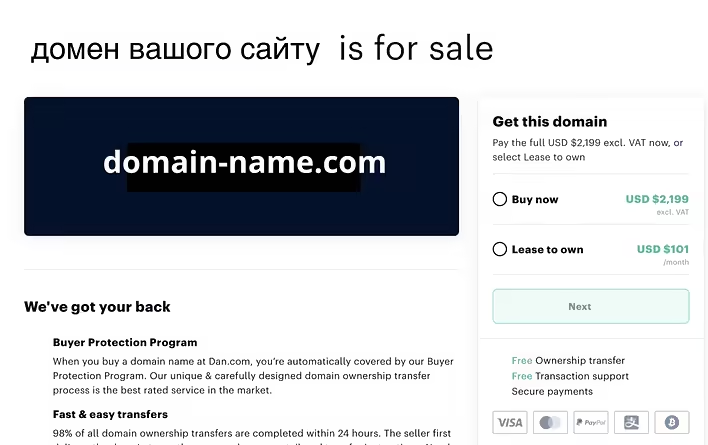
Реєстратор виставив прострочений домен на продаж за ціною 2199 дол.
In the screenshot, you can see an example of how the registrar GoDaddy takes and parks the domain name and lists it for sale at an outrageous price (usually the price for .com is up to $15 per year).
Registrars or specialized services, such as GoDaddy Auctions, may list expired domains for auction. Users can compete for ownership of the domain, which often leads to a significant increase in price.
Sometimes, malicious actors intentionally register expired domains to use them for phishing attacks, spreading malware, or other cybercrimes. Users who click on old links may end up on dangerous sites.
A domain in the hands of malicious actors is the worst thing that can happen after losing control of the domain. Hosting malicious content is not a problem in itself.
Problems include:
the use of your brand/name, etc., which can affect your reputation;
the presence of links to the site from other resources;
Let's consider an example of domain misuse by malicious actorsThere is a website of an educational institution that has been around for more than 10 years. It is referenced by Wikipedia, other educational institutions, government websites, websites with examples of homework solutions, etc.
That is, the site is not on the blacklists of antivirus programs and firewalls. Children may click on links from trusted and verified sites to a domain seized by malicious actors and see unwanted content (pornography, drug advertisements, gambling, etc.). Viruses may also be downloaded to devices that are part of the network of a particular institution or enterprise.
So the thesis about checking links does not work here. The link itself is good, but control over it has already been seized.
But how to find information (well, very necessary) that was posted on a specific domain before the ownership change?
What to do if the link does not lead to the needed information?
If you come across a link that does not lead to the needed information, there are several steps you can take to resolve this issue.
Check the link
Make sure the URL is entered correctly, without extra spaces or errors.
Try to find the needed page using a search engine (e.g., Google). The site may have changed its address, and you might be able to find it through search. Sometimes information may migrate within the same site (change of structure). And sometimes sites change their domain name (one reason is domain expiration and the inability to restore it, so the site is hosted under a new domain name).
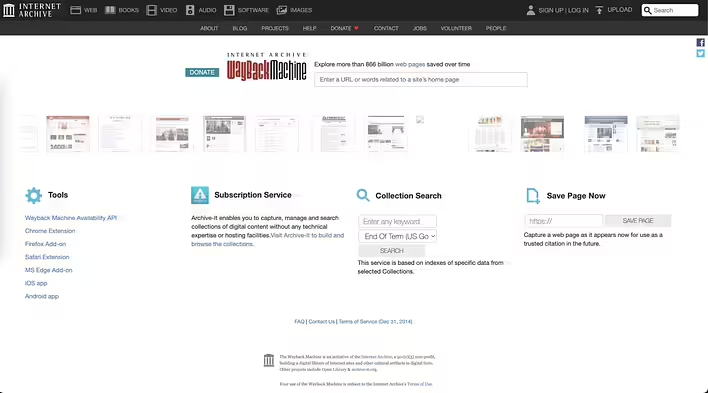
Головна сторінка Wayback Machine (web.archive.org)
Archive services
Use an archive service (Wayback Machine) to find an archived version of the needed page.
Some search engines keep cached copies of pages. Use the "Cached" feature in the search results.
Contact the site administrator or search for alternative sources
If you know who administers the site (try to find contact information on the site or in the archived or cached version of the site), contact the administrator to request the current address of the page. This could be an email, phone number, social media, etc.
If the page is unavailable, try to find information on other resources that may contain similar content.
How does Wikipedia handle outdated links?
Wikipedia, as one of the largest online resources, employs several methods to combat invalid or broken links:
Wikipedia uses bots that regularly check external links on pages. Bots can automatically mark invalid links or even update them if they find more current versions. If a link is not working, users can add special templates, such as {{Dead link}}, which mark the link as invalid. This signals to other editors the need to correct or replace the link.
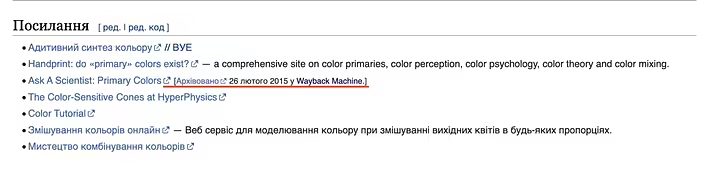
Wikipedia recommends archiving links using services like the Wayback Machine or WebCite and using these archived versions as sources. This helps preserve access to information even if the original link becomes invalid. Wikipedia is based on the principles of collective editing. Anyone can make changes to an article by correcting or replacing invalid links with current ones. The community of editors actively works to maintain the relevance and reliability of information.
Приклад маркування неактивного посилання (додається лінк на архівовану версію)
But not everyone has the resources and capabilities like Wikipedia.
How to avoid domain expiration problems
Make sure to renew your domains on time. Use the auto-renew feature if possible. Always keep your contact information up to date with the registrar to receive notifications about domain expiration.
If you manage a large number of domains (with several registrars) - use domain monitoring services to track the status of your domains and respond promptly to any changes.