
This content has been automatically translated from Ukrainian.
The idea of home internet as just one cable and one computer is long outdated. Today, smartphones, laptops, televisions, gaming consoles, surveillance cameras, and smart home devices connect to the network simultaneously. While one person participates in a video conference, another watches a movie in high quality, and children play online. Therefore, a plan that was sufficient a few years ago may now be inadequate for a typical evening load.
To choose home internet for the whole family, it is not enough to compare just the numbers in the plan descriptions. The real needs of users, the connection technology, the router specifications, the quality of technical support, and the additional services offered by the provider matter.
Start with home scenarios
First of all, it is worth counting not people, but devices. Even in a small family, there can be more than ten: several phones, laptops, a television, a tablet, smartwatches, household appliances, and other Wi-Fi connected devices.
For messaging, browsing websites, and social media, ultra-high speed is not necessary. However, high-definition video, cloud services, downloading large files, and online gaming significantly increase the load. This is especially noticeable when all family members use the network simultaneously.
Before connecting, it is advisable to check which providers operate at a specific address, and then compare the available plans and service conditions. For example, on the website https://www.ittv.ua/ua/, you can familiarize yourself with the home internet plans from ITTV, available equipment, and comprehensive offers with television.
What speed will be sufficient
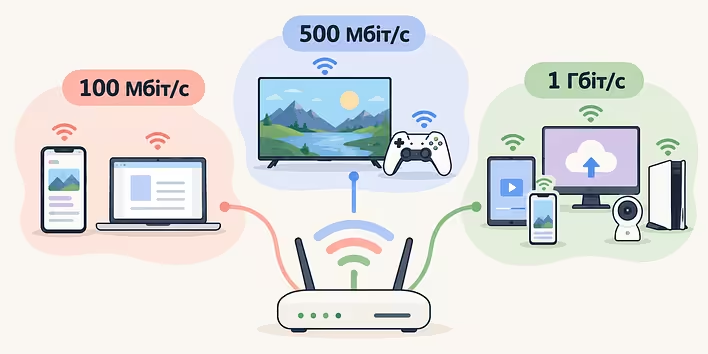
There is no universal indicator for every family, but you can orient yourself based on typical load. A plan with a speed of 100 Mbps is usually sufficient for everyday tasks: browsing websites, communication, working with documents, and streaming video on several devices.
If family members regularly watch 4K content, work with large files, use cloud storage, or play online, a plan with a speed of 500 Mbps may be appropriate. Gigabit connections should be considered for homes with a large number of active devices or when there is a need to quickly upload and transfer significant amounts of data.
At the same time, the speed indicated in the plan characterizes the capabilities of the connection coming into the apartment but does not guarantee the same result via Wi-Fi in every room. The quality of the wireless network is affected by the distance to the router, wall thickness, equipment placement, obstacles, and radio channel congestion. Additionally, the available bandwidth is distributed among all devices that use the internet simultaneously.
Why a good router is no less important than the plan
An old or low-power router can become a weak link even with a fast connection. If the device only supports outdated Wi-Fi standards or is not designed for a large number of connections, it will not allow you to fully utilize the capabilities of the plan.
For a modern apartment, it is advisable to choose a dual-band router that operates on 2.4 and 5 GHz frequencies. The first band usually provides wider coverage and better overcomes obstacles, while the second offers higher speeds at short distances and is often less congested.
In a large apartment, one router may not be enough. In this case, it is worth considering a Mesh system: several modules create a single wireless network and help ensure more even coverage in different rooms.
The placement of the equipment also matters. It is better to install the router closer to the center of the apartment, in an open space, rather than hiding it in a closet or placing it near the floor. If possible, a stationary computer, television, or gaming console should be connected via cable: a wired connection is usually more stable and less sensitive to interference.
Not just speed: what to look for in a provider's terms
Even a fast plan will not be convenient without proper service. Before connecting, it is worth clarifying how much installation work costs, what equipment needs to be purchased or can be rented, and how the provider handles requests in case of malfunctions.
A separate advantage is accessible technical support, especially if the home network is needed for work and study. ITTV offers 24/7 support, and among the additional services provided are cable installation, equipment setup, and other work necessary for setting up a home network.
It is also important to check payment methods, the availability of a personal account, and the conditions for changing the plan. Family needs may change: another television may appear, someone may start working from home, or there may be a need to transfer large files more quickly. The ability to switch to another package without unnecessary difficulties in such situations will be useful.
When to connect the internet along with television
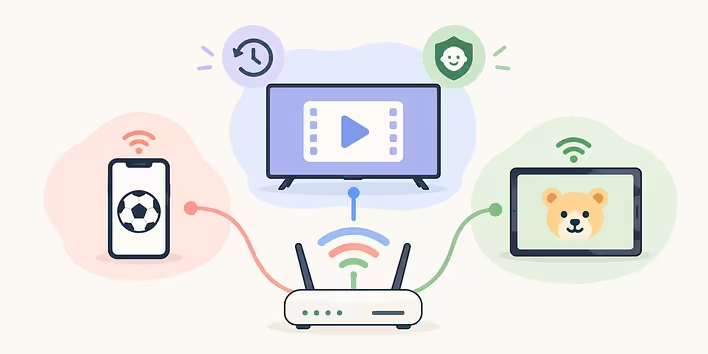
If the family watches TV channels, sports broadcasts, movies, or children's programs, a comprehensive package may be more convenient than ordering several services separately. IPTV allows you to watch television not only on a TV but also on a smartphone or tablet — depending on the plan conditions and the application's capabilities.
When comparing such offers, it is important to look not only at the number of channels. The ability for delayed viewing, parental control, the list of supported devices, and the availability of content that truly interests the family are important. A large selection of channels is not always an advantage if most of them are not used by anyone.
A successful home plan is not necessarily the most expensive or the fastest. It is a connection that meets the actual load, works with the appropriate equipment, and does not create maintenance difficulties. If you assess in advance the number of devices, family habits, and the quality of Wi-Fi coverage in the apartment, the internet will remain an unobtrusive part of daily life — just as a reliable home network should be.
ITTV offers plans with varying speeds — from basic options for everyday tasks to gigabit internet for a large number of devices. You can also connect the internet along with television, use IPTV, select the necessary equipment, and order additional work for setting up a home network. And 24/7 technical support helps you quickly seek assistance if there are difficulties with the connection.
Like it?React
🧵
This post doesn't have any additions from the author yet.