This content has been automatically translated from Ukrainian.
When choosing a laptop, it's easy to focus primarily on price and current needs: enough for work, studying, watching videos, or necessary programs. But if the device is purchased for several years, this is not enough. Some specifications that seem secondary today may become the main limitation over time—especially if the component cannot be replaced or upgraded.
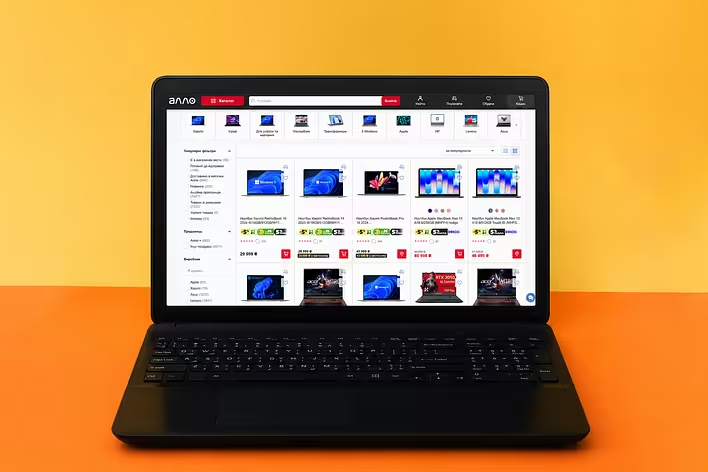
Modern laptops differ not only in performance but also in upgrade options, display quality, cooling systems, port sets, and other details. Even within one catalog https://allo.ua/ua/products/notebooks/, you can find both relatively simple models for everyday tasks and significantly more powerful configurations for working with demanding applications. Therefore, the most expensive option is not necessarily the best long-term purchase. It is much more important to understand what is truly worth paying extra for upfront and what can be upgraded later if needed.
Processor: what you can't replace later
In a desktop computer, the processor can be upgraded under certain conditions, but in laptops, it is almost always installed without the possibility of future replacement. Therefore, choosing an outright weak chip with the thought of "it will be enough for now" is not always beneficial.
For browsing, documents, and watching videos, a top processor is not needed. It is much more important to select a modern model whose performance will be sufficient not only for one application but also for the usual multitasking: dozens of tabs, messengers, video calls, and several work programs simultaneously.
It is also not necessary to overpay for the most powerful processor just "for the future." In a laptop, not just one number in the specifications is important, but a balanced configuration and how well the cooling system allows this processor to operate under load.
RAM: it's better to leave some reserve
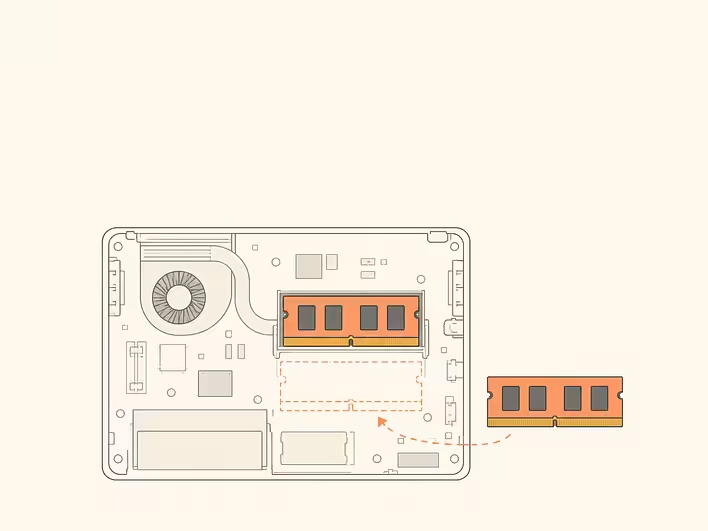
The amount of RAM directly affects how many programs and tabs can be comfortably kept open simultaneously. If the laptop is purchased for several years, 16 GB is a reasonable benchmark for most everyday and work scenarios today.
For video editing, working with large graphic files, 3D, virtual machines, and other resource-intensive tasks, 32 GB or more may be required.
However, the amount itself is not the only important factor. Before purchasing, it is worth checking whether the memory can be increased in a specific model. In some laptops, RAM is completely soldered onto the motherboard, while others have slots for modules or a combined scheme. If an upgrade is not possible, it is better to choose a configuration with a certain reserve right away.
SSD: a small drive fills up faster than it seems
At the start, even a modest SSD size may be sufficient: the operating system is installed, the main programs take up not much space, and documents are hardly felt in the total volume.
Over time, photos, videos, work files, application caches, updates, and backups accumulate. Therefore, for a universal laptop, a 512 GB drive looks much more practical than minimal configurations. If a lot of media files are to be stored, working with video, or installing modern games is planned, 1 TB may prove to be more convenient from day one.
At the same time, the SSD is one of the components where savings can sometimes be made without serious compromise. If the laptop allows for the replacement of the drive or the installation of a second one, expanding storage later is much easier than compensating for a weak processor or graphics card.
Graphics card: reserve is not needed for everyone
For documents, browsing, studying, watching movies, and many work tasks, the capabilities of modern integrated graphics are quite sufficient. There is no sense in buying a discrete graphics card just to make the laptop formally "more powerful": it affects cost, power consumption, heating, and battery life.
The situation is different for modern games, 3D graphics, rendering, editing, and professional programs that actively use the GPU. In such scenarios, the capabilities of the graphics card directly determine performance, and replacing it in most laptops is not possible.
Particularly careful evaluation of the graphics card is necessary when choosing a gaming model. In this segment, https://allo.ua/ua/products/notebooks/klass-igrovye/ presents laptops with various graphics processors and configurations, and the name of the graphics card alone does not provide a complete picture of the device's capabilities. It is important to consider the amount of video memory, the parameters of the specific GPU implementation, and the cooling system. Therefore, even laptops with similar sets of main components can differ significantly in actual performance.
Screen — a characteristic for the entire usage period

RAM or SSD can still be replaced in some models. The display is a different story: you will have to work with the screen installed in the laptop every day.
Therefore, it is worth evaluating not only the diagonal and resolution. Brightness, color reproduction, matrix type, coating, and refresh rate are also very important. There is no single set of characteristics that will be optimal for everyone. For photo work, color accuracy is important; for gaming, matrix speed and refresh rate; and if the laptop is often used outdoors, brightness and screen behavior in external lighting become particularly significant.
It is often on the display that savings are felt more strongly than it seems when viewing specifications in the store. A lack of ports can be partially compensated with a hub, a keyboard with an external one, but a poor built-in screen without connecting to a monitor cannot be fixed.
The cooling system also affects performance
The processor, graphics card, memory, and storage can be easily compared by numbers. The cooling system cannot be described by a single characteristic, so it is often mentioned last during selection.
However, it is precisely from it that the stability of the laptop's performance under prolonged load depends. Powerful components generate more heat, and if the system cannot dissipate it quickly enough, the device may heat up more, become noisy, and reduce performance.
This is especially important for thin performance and gaming models. Before purchasing such a device, it is useful to look at independent temperature tests, noise levels, and behavior under load, rather than limiting oneself to just the specification table.
Ports and upgrade options also work for the future
The set of ports seems secondary until it turns out that an additional hub is constantly needed for simultaneous connection of a monitor, mouse, storage, and charging.
If the laptop is planned to be used for several years, it is worth considering peripherals in advance. USB-A is still needed for a large number of accessories, USB-C may support data transfer, video signal, or charging depending on the implementation, and HDMI simplifies the connection of an external display.
It is also very useful to find out before purchase which components can be upgraded. The ability to add RAM or a second SSD in a few years sometimes turns out to be more valuable than a small advantage in specifications right after purchase.
What you can skip paying extra for
Buying a laptop for several years does not mean choosing the maximum configuration from all available options. Some expensive options mainly affect comfort, design, or specific usage scenarios.
Not everyone needs a touchscreen, a case made of premium materials, RGB lighting, ultra-high resolution, or discrete graphics. It is not always sensible to buy the largest available SSD right away if it can be easily replaced or supplemented.
Instead, specifications that cannot be improved after purchase should be treated more carefully. A good laptop for several years is not necessarily the most expensive model, but a device without obvious weak points: with a sufficient processor, the necessary amount of memory, a comfortable display, a decent cooling system, and features that match the user's real tasks.
Like it?React
🧵
This post doesn't have any additions from the author yet.




![[List 🍋] Where to find lemons in the MonoBank app?](https://cdn.tseivo.com/9p3ymxb33jxgba5gd8e20dlsbm7u)