The concept of packet in computer science refers to a unit of data that is transmitted over a network. Each packet contains two main parts: a header that contains routing information and a payload that contains the actual data being transmitted between clients and servers in web applications.
For better understanding, you can think of a packet as a postal letter. The header of the postal letter contains the addresses of the recipient and sender, as well as other additional data that helps it pass through the network. At the same time, the letter itself contains the content that we want to send.
For example, if you send an email, it can also be considered a packet. The header of the email contains the recipient's address and other technical data that help the routing system deliver the email. At the same time, the text of the email itself, its content, is the packet's payload, or the data you want to send.
Packets are the fundamental unit of data transmission in a network, and they play a key role in ensuring communication between computers.
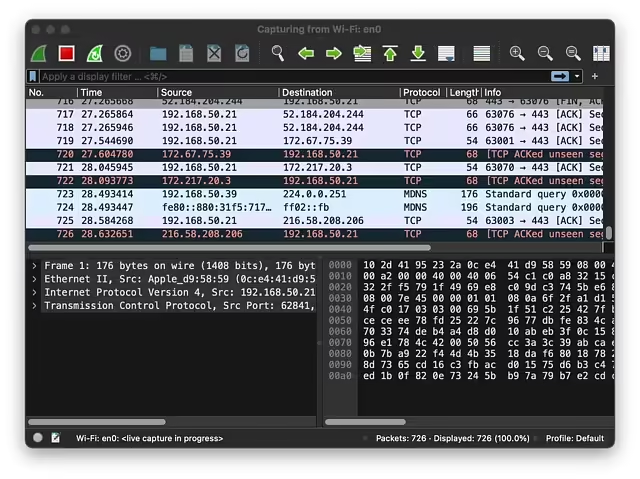
You can see and understand how a packet works using various tools and programs that allow you to view network traffic. One such tool is a network analyzer, for example, Wireshark (there are versions for Windows and MacOS Intel and Arm). It allows you to intercept and analyze packets that are transmitted through your network.
After opening Wireshark, you can select the network interface through which you want to monitor traffic. After that, Wireshark will start intercepting and displaying all packets that pass through this interface.
Wireshark (MacOS M1)
When you find a packet of interest, you can expand it to see all the details. You will see information about the source and destination of the packet, as well as the payload that contains the actual data.
For example, if you send a request for a web page, you can see the corresponding HTTP packet that contains a header with the request method, URL, and other metadata, as well as the request body, which may contain additional data such as query parameters or form data.
Thus, a network analyzer allows you not only to see the packets being transmitted over the network but also to understand their structure and content, which helps in troubleshooting network connectivity issues, detecting attacks, or simply understanding how your network operates.