Table of contentsClick link to navigate to the desired location
🌐 Introduction: Why VPS — is like a coffee machine ⁇ ️ What is VPS and why is it needed at all🧠 RAM — RAM or “brain in action”⚡ SSD and NVMe — speed, which all depends on🧰 Balance — key to everything🧩 Case: «Why is my site slowing down even though I have VPS?»🔍 How to check if you have enough resources🔋 Summary and my advice
This content has been automatically translated from Ukrainian.
🌐 Introduction: Why VPS — is like a coffee machine
You know how it happens: you just want «to work», and as a result you are faced with the choice of — espresso, Americano or Latte?Here with VPS exactly the same. It seems that I will choose any tariff — so that the site spins. And then it turns out that there is not enough power, the «site inhibits», and technical support advises adding resources.
I went through it. And more than once. Therefore, today I want to talk to you honestly, in simple words —, what resources are really important when choosing VPS hosting, and why you should not chase either minimalism or numbers for the sake of numbers.
⁇ ️ What is VPS and why is it needed at all
VPS (Virtual Private Server) — is yours personal corner on a large physical server. It works autonomously like a separate computer in the cloud: you choose OS, install software, run sites, CRM, online stores — whatever.
But the trick is not only that it is convenient. VPS — is control, stability i freedom of action, which you will never get on regular virtual hosting.
And here begins the fun thing: what resources in this «cloud computer» really play a role, and what — are just beautiful numbers in the tariff description?
💪 CPU — your VPS brain
If VPS were human, then CPU (processor) would be his brain. It decides how quickly tasks are performed, how quickly the site reacts and whether the server will withstand the load.
🔹 What is a CPU in a VPS context
Virtual processor (vCPU) — is the share of physical processor power allocated to your server. The more cores, the more tasks can be performed at the same time.But! Not all kernels are equally useful —, much depends on the frequency, architecture and quality of virtualization.
🔹 Example from life
Imagine you have a coffee shop. One barista — is 1 vCPU. If the queue is small — it copes. But if 10 people came running and everyone wants coffee at the same time — needs a second barista.So with VPS: 1 core suitable for a small business card site, and 4–8 cores <TAG1> is already the level of an online store or corporate portal.
🔹 How to choose a CPU for yourself
- 1–2 vCPU <TAG1> blog, landing page, small site.
- 2–4 vCPU <TAG1> online store, CRM, news portal.
- 4+ vCPU <TAG1> corporate projects, SaaS, databases, bots.
💡 Tip: look not only at the number of cores, but also at processor type.Modern AMD EPYC and Intel Xeon Gold work much more efficiently than old models.
🧠 RAM — RAM or “brain in action”
If CPU — is intelligence, then RAM <TAG1> is his ability to remember what he does. It depends on how many tasks the server can keep in operation at the same time.
🔹 Why it matters
When you open a site, it loads the data into RAM. If there is little memory —, the server starts using swap (hard disk instead of RAM), and then the same «brakes» start, which makes the hair stand on end.
🔹 How to understand how much RAM is needed
An example from practice.
I had a client with an online store on WordPress with 500 products. He chose VPS with 1 GB RAM to save. A week later, the site began to load for 10 seconds. After upgrading to 4GB RAM —, everything worked instantly.
So, a couple of dollars in savings is not worth the loss of customers.
🔹 RAM Recommendations
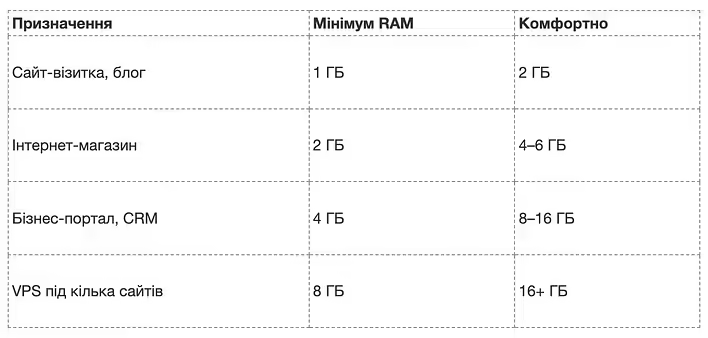
🧩 Remember: RAM — as desktop. The more spacious it is, the more tasks fit without chaos.
⚡ SSD and NVMe — speed, which all depends on
And so we got to the underrated hero — disk system.Many people think that the main thing is — processor and memory. But actually exactly SSD-Disc defines how fast pages, databases and applications load.
🔹 Difference between HDD, SSD and NVMe
- HDD <TAG1> old mechanical disk like cassette. Slow but cheap.
- SSD <TAG1> solid state drive, no moving parts. 5 times faster.
- NVMe SSD <TAG1> champion. Works through the PCIe interface and faster than a regular SSD to 10 times.
📊 Example:A site on HDD can load for 2–3 seconds, and the same site on NVMe — for less than 0.3 seconds.Now multiply it by hundreds of — users and you will understand why NVMe — is not a luxury, but a survival tool in SEO and business.
🔹 When SSD is enough and when NVMe is needed
- SSD <TAG1> if you have a personal website, blog, landing page.
- NVMe <TAG1> if we are talking about business, where response speed is important (stores, CRM, SaaS).
💬 I, for example, once placed a test base on the NVMe server — and was impressed. Importing a 3GB base that used to take 6 minutes took... 18 seconds!
That's the power of making the right choice.
🧰 Balance — key to everything
It is important to understand: VPS — is not a race for maximum characteristics.It makes no sense to take 8 cores and 32 GB of storage if your site consumes 10% of that. But saving on the resource you need, — is also a way to nowhere.
Here's mine personal VPS selection algorithm:
- I determine project load (CMS, traffic, number of processes).
- I take VPS with a margin of CPU and RAM of 20–30%.
- I look at storage type <TAG1> SSD or NVMe only.
- They take into account location of the data center <TAG1> is closer to my audience.
- I evaluate support level <TAG1> Self-managed or Managed.
⁇ ️ The main thing is to find a balance between price and power. VPS — as a car: it is not necessary to take a sports car if you drive around the city, but you will not climb uphill on a scooter either.
🧩 Case: «Why is my site slowing down even though I have VPS?»
One client had a VPS with 4 cores and 8 GB of RAM, but the site was slow to open.It turned out that the disk was HDD. After migrating to NVMe, the download time was reduced from 4.2 to 0.9 seconds. Everything else remained the same.
Morality? A — disk is no less important than a processor or memory.If VPS — is the brain and hands of your project, then SSD — is its nervous system.
🔍 How to check if you have enough resources
You don't have to be an administrator to figure it out.There are simple tools:
- htop <TAG1> shows CPU and RAM downloads in real time.
- iostat <TAG1> helps to estimate the speed of the disk.
- ping and traceroute <TAG1> measure server response.
If you see that the processor “hangs” by 90%, and the RAM is constantly full —, it's time to upgrade the tariff.VPS — as an apartment: if you can't put a table, then you need to look for a larger room.
🔋 Summary and my advice
Let's summarize:
- CPU <TAG1> is responsible for task processing speed.
- RAM <TAG1> for the ability to work without hangs.
- SSD/NVMe <TAG1> for download speed and system feedback.
If one of these elements “sags”, the entire project suffers. VPS — as an orchestra: even if the violinist is a virtuoso, without drums the music will not flirt.
💬 I will add from myself:don't be afraid to experiment. Try different configurations, measure performance, and you will definitely feel where the middle ground is for your project.
🚀 Final: Choose your VPS wisely
I always tell customers: don't buy VPS “for growth” — buy VPS “for meaning”.Evaluate what you are really using and invest where the return is maximum.
If you haven't decided where to start —, try VPS server from DeltaHost (https://deltahost.ua/vps.html).There are flexible configurations, NVMe drives and support that won't leave you in trouble.
And most importantly — you will understand that VPS — is not a scary server beast“, but your reliable partner on the Internet.
Good luck, friends! And let your server always run as fast as coffee in the morning ☕💻
This post doesn't have any additions from the author yet.