This content has been automatically translated from Ukrainian.
🌐 Introduction: why VPS is like a coffee machine
You know how it is: you just want it to "work," and then you find yourself faced with a choice — espresso, americano, or latte?It's the same with VPS. It seems like any plan will do — as long as the site runs. But then it turns out that the resources are insufficient, the site is "lagging," and tech support advises adding more resources.
I’ve been through this. More than once. So today I want to talk to you honestly, in simple terms — which resources are truly important when choosing VPS hosting, and why you shouldn't chase minimalism or numbers for the sake of numbers.
⚙️ What is VPS and why do you need it
VPS (Virtual Private Server) is your personal corner on a large physical server. It operates independently, like a separate computer in the cloud: you choose the OS, install software, run websites, CRMs, online stores — anything you want.
But the point is not just that it's convenient. VPS provides control, stability, and freedom of action that you will never get with regular shared hosting.
And this is where it gets interesting: which resources in this "cloud computer" really matter, and which are just pretty numbers in the plan description?
💪 CPU — the brain of your VPS
If VPS were a person, then CPU (processor) would be its brain. It determines how quickly tasks are executed, how fast the site responds, and whether the server can handle the load.
🔹 What is CPU in the context of VPS
A virtual CPU (vCPU) is a portion of the power of a physical processor allocated to your server. The more cores, the more tasks can be executed simultaneously.But! Not all cores are equally useful — much depends on frequency, architecture, and the quality of virtualization.
🔹 A real-life example
Imagine you have a coffee shop. One barista is 1 vCPU. If the line is small — he manages. But if 10 people rush in and all want coffee at the same time — a second barista is needed.It's the same with VPS: 1 core is suitable for a small landing page, while 4–8 cores is already the level of an online store or corporate portal.
🔹 How to choose CPU for yourself
- 1–2 vCPU — blog, landing page, small site.
- 2–4 vCPU — online store, CRM, news portal.
- 4+ vCPU — corporate projects, SaaS, databases, bots.
💡 Tip: look not only at the number of cores but also at the type of processor.Modern AMD EPYC and Intel Xeon Gold are much more efficient than older models.
🧠 RAM — memory or “brain in action”
If CPU is the intellect, then RAM is its ability to remember what it’s doing. It determines how many tasks the server can keep running simultaneously.
🔹 Why this is important
When you open a website, it loads data into memory. If there isn’t enough memory — the server starts using swap (hard disk instead of RAM), and then the same "lag" occurs that makes your hair stand on end.
🔹 How to understand how much RAM you need
A practical example.
I had a client with an online store on WordPress with 500 products. He chose a VPS with 1 GB of RAM to save money. After a week, the site started loading in 10 seconds. After upgrading to 4 GB of RAM — everything worked instantly.
So, saving a couple of dollars isn’t worth losing customers.
🔹 RAM recommendations
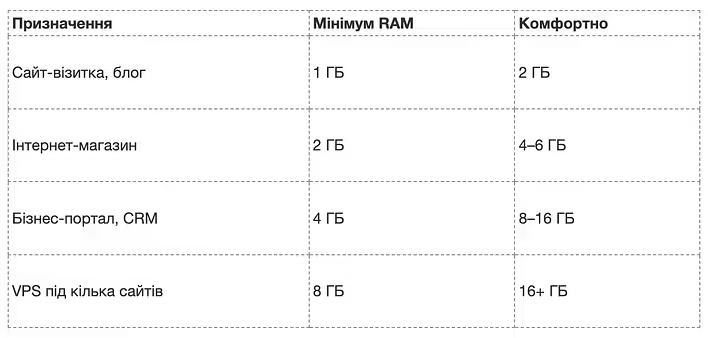
🧩 Remember: RAM is like a workspace. The larger it is, the more tasks can fit without chaos.
⚡ SSD and NVMe — speed that matters
And here we come to the underrated hero — the disk system.Many think that the main thing is the processor and memory. But in reality, it is the SSD drive that determines how quickly pages, databases, and applications load.
🔹 The difference between HDD, SSD, and NVMe
- HDD — an old mechanical disk, like a cassette. Slow but cheap.
- SSD — a solid-state drive, with no moving parts. 5 times faster.
- NVMe SSD — the champion. Works through PCIe interface and is up to 10 times faster than a regular SSD.
📊 Example:A site on HDD may load in 2–3 seconds, while the same site on NVMe loads in less than 0.3 seconds.Now multiply this by hundreds of users — and you’ll understand why NVMe is not a luxury, but a survival tool in SEO and business.
🔹 When is SSD enough, and when is NVMe needed
- SSD — if you have a personal site, blog, landing page.
- NVMe — if it’s about business where response speed is important (stores, CRM, SaaS).
💬 For example, I once hosted a test database on an NVMe server — and I was amazed. Importing a 3 GB database that used to take 6 minutes took... 18 seconds!
This is the power of the right choice.
🧰 Balance — the key to everything
It’s important to understand: VPS is not a race for maximum specifications.There’s no point in getting 8 cores and 32 GB of memory if your site consumes 10% of that. But saving on the resources you need is also a path to nowhere.
Here’s my personal VPS selection algorithm:
- Determine the project load (CMS, traffic, number of processes).
- Choose a VPS with a CPU and RAM reserve of 20–30%.
- Look at the type of storage — only SSD or NVMe.
- Consider the data center location — closer to my audience.
- Evaluate the level of support — Self-managed or Managed.
⚖️ The main thing is to find a balance between price and power. VPS is like a car: you don’t necessarily need a sports car if you drive in the city, but you can’t climb a hill on a scooter.
🧩 Case: “Why is my site slow, even though I have VPS?”
One client had a VPS with 4 cores and 8 GB of RAM, but the site opened slowly.It turned out the disk was HDD. After migrating to NVMe, the loading time decreased from 4.2 to 0.9 seconds. Everything else remained the same.
The moral? The disk is no less important than the processor or memory.If VPS is the brain and hands of your project, then SSD is its nervous system.
🔍 How to check if you have enough resources
You don’t have to be an administrator to understand this.There are simple tools:
- htop — shows CPU and RAM load in real-time.
- iostat — helps assess disk speed.
- ping and traceroute — measure server response.
If you see that the CPU is “hanging” at 90%, and RAM is constantly full — it’s time to upgrade your plan.VPS is like an apartment: if you can’t fit a table, it means you need to look for a bigger room.
🔋 Summary and my advice
Let’s summarize:
- CPU — responsible for task processing speed.
- RAM — for the ability to work without lags.
- SSD/NVMe — for loading speed and system response.
If one of these elements “drops,” the entire project suffers. VPS is like an orchestra: even if the violinist is a virtuoso, without percussion, the music won’t play.
💬 I’ll add from myself:don’t be afraid to experiment. Try different configurations, measure performance, and you will definitely feel where the golden mean lies for your project.
🚀 Finale: choose your VPS wisely
I always tell clients: don’t buy a VPS “for growth” — buy a VPS “for purpose”.Evaluate what you actually use and invest where the return is maximum.
If you haven’t decided where to start — try VPS server from DeltaHost (https://deltahost.ua/vps.html).They have flexible configurations, NVMe disks, and support that won’t leave you in trouble.
And most importantly — you will understand that VPS is not a “scary server beast,” but your reliable partner on the internet.
Good luck, friends! And may your server always run as fast as coffee in the morning ☕💻
Like it?React
🧵
This post doesn't have any additions from the author yet.