The world is amazing: we have gigabit internet, Wi-Fi 6, mesh systems, and sometimes it’s enough… just to restart the router. And everything magically “comes to life.” Magic? No.
Why you need to restart the router
A router is a small computer. It has a processor, RAM, and firmware. It:
holds NAT tables (who is connected to whom),
distributes IPs via DHCP,
supports Wi-Fi sessions for dozens of devices,
sometimes runs for weeks without a pause.
Over time, “hanging” sessions accumulate in memory, Wi-Fi driver errors occur, and memory fragmentation increases. This is not a disaster, but a normal property of any system that runs for a long time without a restart. Restarting clears the connection tables and gives the firmware a fresh start.
It’s like restarting a browser after 100 tabs - the world suddenly becomes faster.
What restarting provides in practice
Clearing NAT tables - fewer strange freezes in Zoom or Discord.
Resetting the Wi-Fi radio module - a more stable signal.
Updating the connection with the provider - a new PPPoE/DHCP session, sometimes a new IP.
Aligning after micro-errors in the firmware.
This is especially noticeable if the router is budget-friendly or runs 24/7 with a large number of devices.
Built-in scheduled reboot
Many modern routers already have this feature.
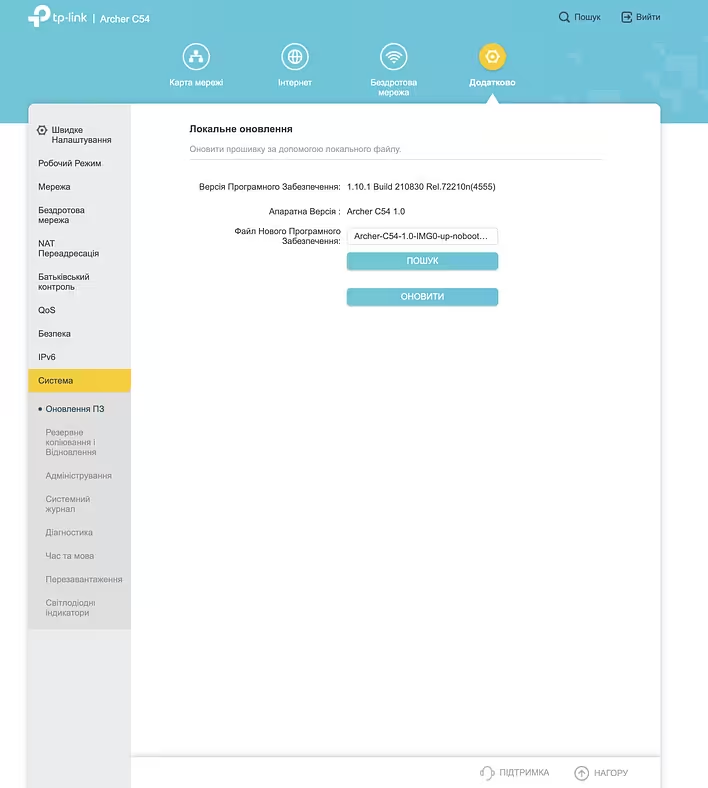
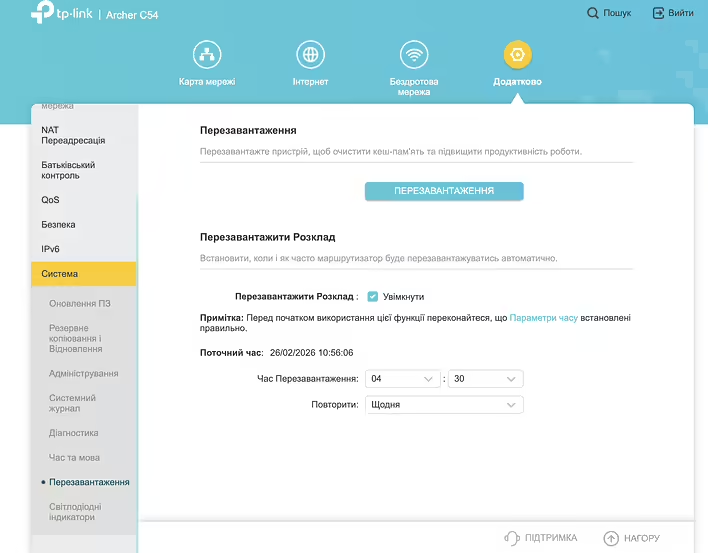
For example, in TP-Link routers, in the System Tools section, you can set up a “Reboot Schedule” - an automatic restart once a day or week at night.
мій роутер
In MikroTik models, this is done through the Scheduler - you can set a script to reboot every 7 days.
In the OpenWrt firmware, there is cron - essentially a Linux task scheduler, where you can easily write a regular reboot.
The idea is simple: rebooting at 04:30, when everyone is asleep, and no one notices.
Automation through a smart socket
If the router does not have a scheduled reboot function - you can do it through a smart socket.
A smart socket (for example, TP-Link Tapo P110) can:
turn off the power,
wait 1-2 minutes,
turn back on.
This is a hard power cycle - the most reliable method.
A subtle point: if the socket depends on Wi-Fi and the cloud, it may not execute the script when the internet is already “down.” It’s better when the schedule is stored locally or there is a hub with local automation.
Why this is especially important during blackouts (PON)
This is where the interesting physics of networks begins.
Many cities in Ukraine operate through PON (Passive Optical Network). The fiber comes to the apartment, but:
there are distribution nodes in the building or on the street,
the provider has active equipment,
you have an ONU/ONT (optical terminal).
During a power outage:
the provider may switch to backup power,
some nodes restart at different times,
the ONU and router start at different times.
As a result, there is a state where “everything seems to be on,” but the session did not start correctly. DHCP did not update. PPPoE hung. The optical terminal established a link, but the router did not.
After blackouts, the network goes through a phase of instability. Regular or controlled rebooting:
synchronizes the startup of devices,
allows for a new session,
reduces the number of “strange” states without internet.
This is especially relevant if you have a UPS (Uninterruptible Power Supply), and the router does not turn off with the house - then it can “live in its own world” while the provider's network has already restarted.
Practical approach
A rational option:
Once a week - automatic night restart.
After major blackouts - manual or automated power cycle.
If there is a UPS - reboot both the ONU and the router together.
Restarting is not a cure for all ailments, but it is network hygiene. A small technical ritual that reduces chaos in the system.
The world of networks is complex and nonlinear. The internet is not just “a cable in the wall,” but a multi-layered system with a bunch of states, timers, and protocols. Sometimes the smartest thing to do is to let everything start over.
I just started to tackle this issue. The internet seems to be there, but it works very poorly. So I added scheduled rebooting to my Archer C54 router. I hope this will help stabilize my home network a bit. I will report back on the results in a week or two. I also plan to try the Tapo P110 scheduler (if the reboot once a day is not enough with the router's own settings).


![[Personal experience] Replaced the speakers on macbook a2337 (speaker from Ali)](https://d3kb0xa9zqcv9v.cloudfront.net/uf686v8beaqlorcqcoybp2hxbgxp)