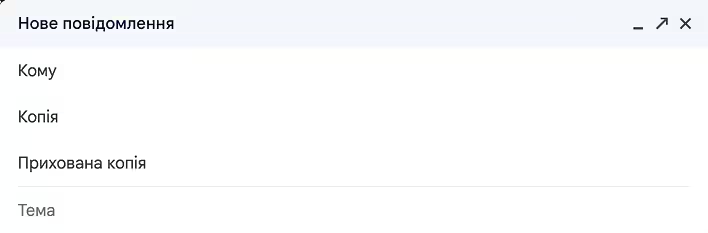
CC (Carbon Copy) and BCC (Blind Carbon Copy) are two fields used when sending emails to include additional recipients.
Gmail - інтерфейс створення нового листа
When you add an email address in the CC field (simply a copy in Ukrainian), it means you are sending a copy of the email to that person, and all other participants in the correspondence can see who else received that copy. This is useful for ensuring transparency in work or group emails.
BCC (in Ukrainian - blind copy) differs in that while you are also sending a copy of the email to the recipients added in this field, the names of those recipients are not visible to other recipients of the email. This is useful for maintaining the privacy of recipients, for example, when sending messages to a large group of people (such as advertisements).
BCC functionality is important in marketing. Sending a promotional email to many recipients is greatly simplified:
all recipients are listed in BCC at once (there is no need to create and send separate emails);
the list of recipients remains private (none of the recipients will see the email addresses of others);
There are situations when marketers accidentally add all recipients to CC (instead of BCC), thereby 'leaking' a valuable customer database. This can have very negative consequences.
Why is it called carbon copy?
The term "carbon copy" (CC), which translates as "copy on carbon paper," comes from the method of making copies of documents before the advent of digital technology. This involved using carbon paper placed between two sheets of regular paper. When writing or printing on the top sheet, the pressure transferred the ink from the carbon paper to the bottom sheet, creating a copy of the original.
This method allowed for simultaneous creation of copies of a letter while it was being written. This physical process is reflected in the name of the "CC" function in emails, where users can send "copies" of the email to additional recipients. Thus, the historical technique of making copies gave its name to this function in modern email systems.
Blind (blind) is an additional word that characterizes the extra function of hiding recipients.
How does the 'reply' function work if the email has CC and BCC?
The "reply" function in emails works slightly differently depending on whether you choose "reply" or "reply all." Here's how it works with addresses added in the CC and BCC fields:
Reply: If you simply click "reply," your response will be sent only to the person who sent you the email. Addresses entered in the CC and BCC fields in the original email will not receive your response.
Reply All: This option will send your response not only to the person who sent you the email but also to everyone else whose addresses were listed in the CC field of the original email.
However, it is important to note that addresses that were in the BCC field will not receive your response, even if you use "reply all." This is because the information about BCC addresses is not retained in the email.
BCC remains confidential and hidden from everyone. But the BCC recipient does not receive a response if the reply all option was used.
What does CC mean in chats?
In chats, especially in corporate messengers like Slack or Microsoft Teams, CC is used to include additional people in the chat/discussion. For example, you might be discussing an issue. But there is someone in the company who has some information about the specific situation. You can "call" them by writing CC: @username, which means - Hey @username, pay attention to this discussion and join in.
This is more of a nod to email style. In chats, you can simply invite people to join the discussion without using acronym CC.