This content has been automatically translated from Ukrainian.
DDL (Data Definition Language) and DML (Data Manipulation Language) are two key concepts in the field of relational databases.
DDL (Data Definition Language)
DDL (Data Definition Language) is a data description language. This language is used to describe the structure of a database, to create, modify, and delete database objects. Here we deal with objects such as tables, indexes, schemas, etc.
For example, to create a new table in the database in SQL, you can use the following code:
CREATE TABLE users (
    id INT PRIMARY KEY,
    username VARCHAR(50) NOT NULL,
    email VARCHAR(100) UNIQUE NOT NULL,
    created_at TIMESTAMP DEFAULT CURRENT_TIMESTAMP
);
In this example, we used the DDL operation CREATE TABLE to create a new table named "users". The fields "id", "username", and "email" are described with their data types and constraints such as NOT NULL and UNIQUE. Additionally, we specified that the value for the "created_at" field will default to the current time (the time at creation).
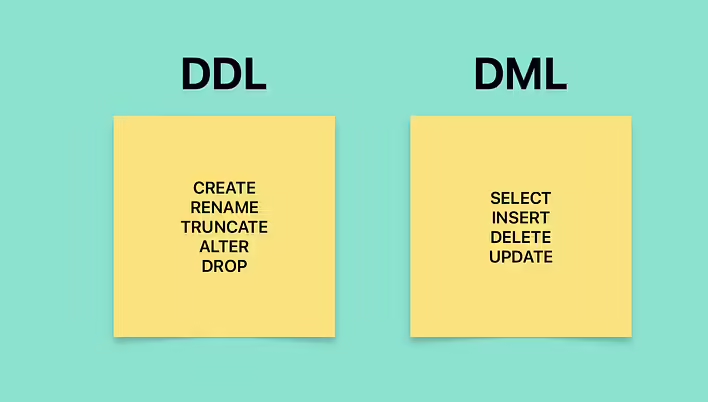
There are several main operations in DDL that are used to define and modify the structure of the database:
CREATE: This operation is used to create new database objects such as tables, indexes, etc.
ALTER: The ALTER operation allows you to modify the structure of existing database objects, for example, adding, modifying, or deleting columns in a table.
DROP: This operation is used to delete existing database objects such as tables, indexes, etc.
TRUNCATE: The TRUNCATE operation is used to delete all records from a table while keeping the table itself.
RENAME: used to change the name of existing database objects such as tables, columns, indexes, etc.
DML (Data Manipulation Language)
DML (Data Manipulation Language) is a data manipulation language. It is used to work with the content of the database, that is, to create, update, delete, and retrieve (search) data from tables.
Let's consider an example of using DML operations in SQL:
-- Adding a new user
INSERT INTO users (username, email)
VALUES ('user_name', 'user@tseivo.com');

-- Updating user data
UPDATE users
SET username = 'new_user_name'
WHERE id = 1;

-- Deleting a user
DELETE FROM users
WHERE id = 1;

-- Selecting data from the table
SELECT * FROM users;
In these examples, we use DML operations INSERT, UPDATE, DELETE, and SELECT to create a new record in the table, update user information, delete a user, and retrieve all users from the table, respectively.
The main DML operations:
INSERT: This operation is used to add (create) new records in the database.
UPDATE: The UPDATE operation allows you to change the data of existing records in the table.
DELETE: This operation is used to delete records from the database table.
SELECT: Used to retrieve (search) data from database tables.
Difference between DML and DDL
To reinforce the material, let's repeat the difference between these two terms.
DDL (Data Definition Language) | DML (Data Manipulation Language)
Definition and Manipulation are the main differences between the terms. The first (definition) is about tables (describing, creating, configuring tables). The second (manipulation) is about data, specifically about manipulating it (creating, updating, deleting, and searching data in tables).
DDL and DML in migrations in Ruby on Rails
Example of a DML migration in Ruby on Rails to add a new column to a table:
class AddNameToUsers < ActiveRecord::Migration[7.0]
  def change
    add_column :users, :name, :string
  end
end
In this migration, we use the add_column method to add a new column named "name" with the type "string" to the "users" table.
Example of a DDL migration in Ruby on Rails to create a new table:
class CreateProducts < ActiveRecord::Migration[7.0]
  def change
    create_table :products do |t|
      t.string :name
      t.decimal :price

      t.timestamps
    end
  end
end
In this migration, we use the create_table method to create a new table "products" with columns "name", "price", and timestamp columns "created_at" and "updated_at".
An example of a migration in Ruby on Rails with disable_ddl_transaction!
class AddIndexesToProducts < ActiveRecord::Migration[7.0]
  disable_ddl_transaction!

  def change
    add_index :products, :name
    add_index :products, :price
  end
end
In this migration, we use disable_ddl_transaction! to disable the transaction for creating indexes on the "products" table. This can be useful in situations where creating indexes takes a long time and you want to perform this operation without waiting for the transaction to complete. But what is a transaction and why should it be disabled?
DDL (Data Definition Language) transactions are transactions that involve operations that change the structure of the database. Such operations may include creating, modifying, or deleting tables, columns, indexes, and other database objects.
When you perform DDL operations (for example, creating a table or adding a new column), these operations are typically executed within a transactional context. This means that they will be carried out as a single atomic operation - either it will be executed completely, or it will not be executed at all.
However, in some cases, especially when performing massive DDL operations, such as adding indexes to large tables, including a transactional context can lead to performance issues (because the table will be locked during the transaction. for example, users will not be able to create new orders). In such cases, you can use disable_ddl_transaction! in Ruby on Rails migrations to disable the transactional context for DDL operations. Thus, these operations will be executed without waiting for the transaction to complete.
disable_ddl_transaction! is convenient to use when you want to avoid locking tables during large schema creation or modification operations. But you must be sure that this operation is indeed safe to perform outside of a transaction.
Like it?React
🧵
This post doesn't have any additions from the author yet.