This content has been automatically translated from Ukrainian.
rails console --sandbox starts the Rails console in a special mode where all changes made to the database are automatically rolled back after the console session ends. This flag provides a safe environment for testing, where you can experiment with data without worrying about permanent changes.
I had never used the --sandbox option before. But in recent days, I have started using it actively. Sometimes it happens that after messing around in the local database, you need to reset it. The sandbox allows you to save some time. All actions in the console are wrapped in a large, smart atomic transaction.
How does rails console --sandbox work?
Using the rails console --sandbox command opens an interactive console in 'safe mode'. Each operation with the database occurs within a transaction. After exiting the console, all transactions are automatically rolled back. This allows you to safely test changes and check code without the risk of damaging data in the database.
Example
rails console --sandbox
The console will tell us:
Loading development environment in sandbox (Rails 7.0.4.3)
Any modifications you make will be rolled back on exit
Let's create a user:
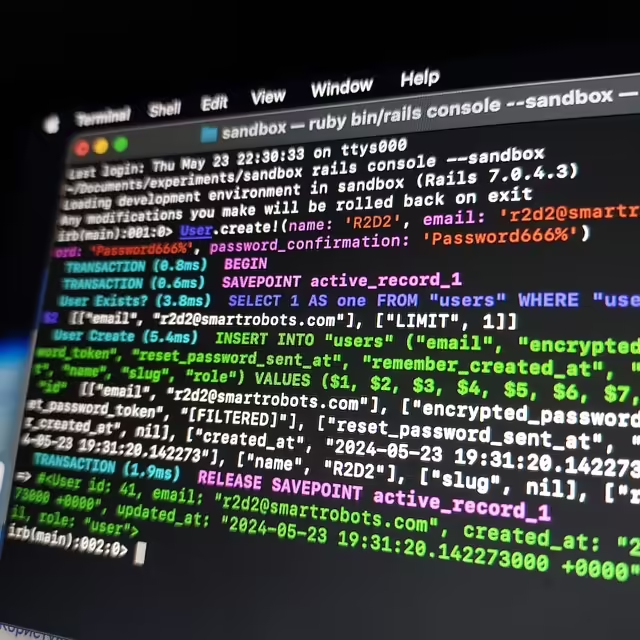
User.create!(name: 'R2D2', email: 'r2d2@smartrobots.com', password: 'Password666%', password_confirmation: 'Password666%')
We will get the following log:
irb(main):001:0> User.create!(name: 'R2D2', email: 'r2d2@smartrobots.com', passw
ord: 'Password666%', password_confirmation: 'Password666%')
  TRANSACTION (0.8ms)  BEGIN
  TRANSACTION (0.6ms)  SAVEPOINT active_record_1
  User Exists? (3.8ms)  SELECT 1 AS one FROM "users" WHERE "users"."email" = $1 LIMIT $2  [["email", "r2d2@smartrobots.com"], ["LIMIT", 1]]
  User Create (5.4ms)  INSERT INTO "users" ............
  TRANSACTION (1.9ms)  RELEASE SAVEPOINT active_record_1
=> #<User id: 41, email: "r2d2@smartrobots.com", created_at: "2024-05-23 19:31:20.142273000 +0000", updated_at: "2024-05-23 19:31:20.142273000 +0000", name: "R2D2" ....>
Note the TRANSACTION (1.9ms) RELEASE SAVEPOINT active_record_1
We exit the console (the transaction should roll back). We enter again and check User.last.id. In the sandbox, we created a user with id 41.
irb(main):002:0> exit
~/Documents/experiments/sandbox rails console
Loading development environment (Rails 7.0.4.3)
irb(main):001:0> User.last.id
  User Load (1.9ms)  SELECT "users".* FROM "users" ORDER BY "users"."id" DESC LIMIT $1  [["LIMIT", 1]]
=> 40
We see that the last saved user is 40. That is, the transaction worked.
Like it?React
🧵
This post doesn't have any additions from the author yet.


![[Fix] Factory not registered: "user" (KeyError) (FactoryBot / Rails 7)](https://cdn.tseivo.com/gyxl720efgaf5xep8a661gf5w5th)