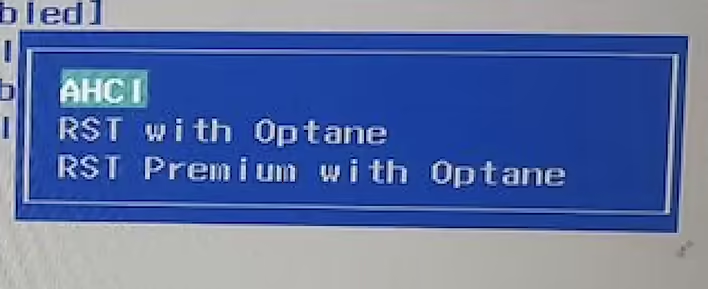
RST (Rapid Storage Technology) with Optane is a combination of two technologies used in computer systems: RST (Rapid Storage Technology) and Optane Memory.
RST (Rapid Storage Technology) is a software component developed by Intel that provides various features for optimizing data storage operations, such as hard drives and SSDs. It offers capabilities such as data caching, RAID arrays, hot-swapping devices, and more.
Optane Memory
Optane Memory is a product developed by Intel that utilizes 3D XPoint memory technology. It acts as an intermediary layer between the solid-state drive (SSD or HDD) and the computer's RAM. Optane Memory allows for faster data access and improved system performance by caching frequently used data and accelerating storage operations.
RST with Optane
RST with Optane combines these two technologies to enhance data storage performance. By using Optane Memory as a cache, RST can automatically and intelligently identify and cache the most active data, reducing access times. This can lead to improved boot times for the operating system, application launches, and other disk data access tasks.
RST with Optane is typically used on computers that support Optane technology and have Optane memory connected to the motherboard. Some Intel motherboards support RST with Optane that are compatible with M.2 or U.2 standards for connecting Optane Memory.
What is the difference between RST with Optane and RST Premium with Optane?
RST with Optane and RST Premium with Optane are two different levels of functionality and features offered with Optane technology.
1. RST with Optane: This version is the basic implementation of Rapid Storage Technology (RST) with support for Optane Memory. It provides essential features such as data caching and improved access speeds using Optane Memory. RST with Optane supports hot-swapping devices, RAID arrays, and other storage management features.
2. RST Premium with Optane: This version is an advanced implementation of Rapid Storage Technology (RST) with support for Optane Memory. RST Premium with Optane offers additional features and capabilities compared to the basic version. Some of these additional features include Accelerated Storage Mode, which provides even greater performance, and support for platform-level data protection (Platform RAID). RST Premium with Optane can also work with larger amounts of Optane memory, allowing for more flexible caching and data acceleration configurations.
Thus, the main difference between RST with Optane and RST Premium with Optane lies in the level of functionality and features they provide. RST Premium with Optane has more advanced features and offers a higher level of performance and configurations compared to the basic version of RST with Optane.
What is the main difference between RST Optane and AHCI?
AHCI is a data transfer interface between the operating system and data storage (e.g., hard drive or solid-state drive). AHCI provides basic functions for data transfer over the SATA (Serial Advanced Technology Attachment) interface. It supports data transfer speeds of up to 6 gigabits per second (SATA 6 Gbps) and features such as hot-swapping devices and power-saving settings.
RST with Optane uses AHCI as the base interface for data transfer but adds additional features related to the use of Optane memory. Optane Memory acts as an intermediary layer between the solid-state drive (SSD or HDD) and the computer's RAM. RST with Optane uses Optane Memory as a cache to accelerate data access and improve performance. It intelligently identifies and caches the most active data to reduce access times.
Thus, AHCI is a standard (universal) data transfer interface that works with SATA devices, supporting basic data transfer functions. On the other hand, RST with Optane uses AHCI as the base interface but adds support for Optane Memory technology to enhance data storage performance through caching and accelerating access to active data.
On many computers, you can choose the desired mode. For example, the Acer Nitro 5 laptop has all three modes. RST with Optane worked when Windows 11 Home was installed. When installing Ubuntu, the installation wizard showed a message that I had to disable RST.