Imagine that you ordered coffee at a café. The barista takes the order, issues a receipt, and says, “Please wait a moment.” You don’t stand still; you can go sit at a table, check your phone, or reply to messages. When the coffee is ready, the barista calls you – and you get the result.
Promise in JavaScript works the same way:
You make a request (for example, to a server) and receive a promise that the response will come later.
JavaScript does not stop executing code – it continues to perform other tasks.
When the result is ready, the Promise notifies you, and you can handle it.
Simple Promise Example
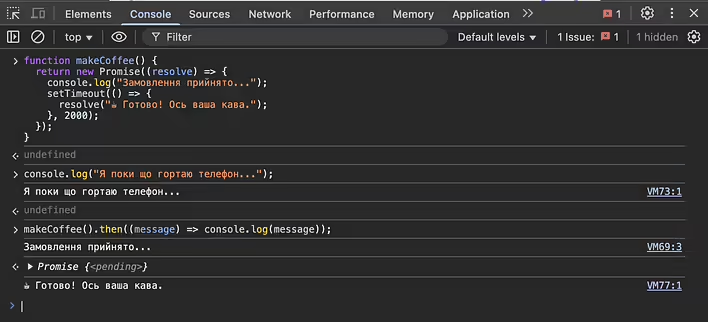
function makeCoffee() {
  return new Promise((resolve) => {
    console.log("Order accepted...");
    setTimeout(() => {
      resolve("☕ Ready! Here is your coffee.");
    }, 2000);
  });
}

console.log("I’m scrolling through my phone for now...");
makeCoffee().then((message) => console.log(message));
First, console.log("I’m scrolling through my phone for now...") will execute because the promise does not block the code.
Then, after 2 seconds, "☕ Ready! Here is your coffee." will appear when the promise is fulfilled.
If something goes wrong (for example, if the coffee runs out), we can add .catch():
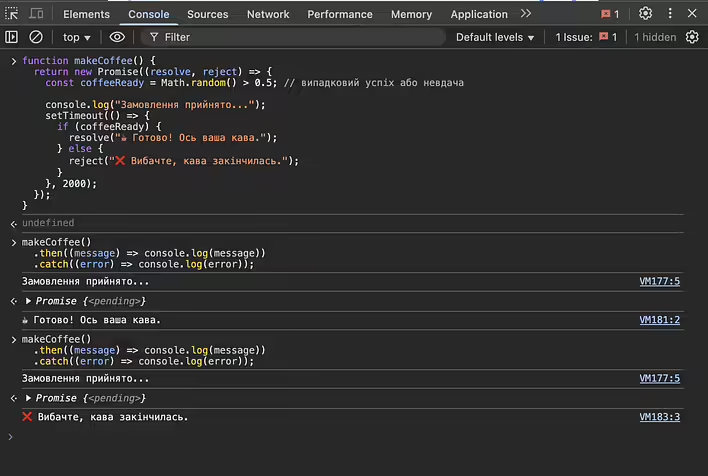
function makeCoffee() {
  return new Promise((resolve, reject) => {
    const coffeeReady = Math.random() > 0.5; // random success or failure

    console.log("Order accepted...");
    setTimeout(() => {
      if (coffeeReady) {
        resolve("☕ Ready! Here is your coffee.");
      } else {
        reject("❌ Sorry, the coffee has run out.");
      }
    }, 2000);
  });
}

makeCoffee()
  .then((message) => console.log(message))
  .catch((error) => console.log(error));
This is like real life: if there is no coffee, the barista apologizes, and you receive an error response.
How to Understand Quickly?
Try writing promises yourself: create a function that waits 3 seconds before responding, or one that randomly ends with an error. This way, you can quickly understand how asynchronous code works.
But before you start experimenting with promises, you need to understand the structure (resolve, reject, catch, etc.). There is a separate post on this.




![[Fix] Heroku / SearchBox addon - indexing error "The client is unable to verify that the server is Elasticsearch"](https://d3kb0xa9zqcv9v.cloudfront.net/m448ldh0z3jg07nqvkzqasw9g4nv)