I have already written a minimal overview of the functionality of the gosu library. To write a simple 2D game, you really don't need much code. You can also avoid graphical elements and use simple shapes (programmatically drawn). For starters (while learning the engine), this is the way to go, but a jumping rectangle may not be as cool as something drawn.
I took free icons (attribution is required under the terms of use) Freepik on the Flaticon website. You can find completely free graphics, draw them yourself, order them, or generate them using AI. Generated content may be suitable for the development process, but for the release into the world, it is still better to use the services of artists and support the economy and their creativity.
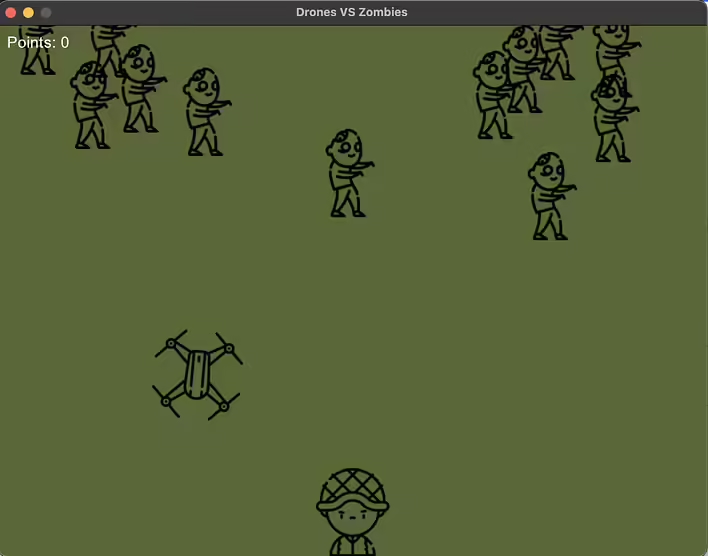
So let's return to the topic of this post - the demo of the game Drones vs Zombies. The concept is quite simple - using a drone, you need to destroy zombies that are trying to reach the pilot. The demo is not perfect, but it nicely demonstrates that approximately 250 lines of code and a few images can turn an idea/concept of a game into a demo.
The code of my demo:
# Drones VS Zombies v.1.0.0

# Icons: https://www.flaticon.com/authors/freepik
# Code:  demo by memecode https://tseivo.com/b/memecode

require 'gosu'

class DroneGame < Gosu::Window
  WIDTH = 800
  HEIGHT = 600

  def initialize
    super(WIDTH, HEIGHT)
    self.caption = "Drones VS Zombies"
    reset_game
    @background_color = Gosu::Color.new(255, 85, 104, 50)
    @font = Gosu::Font.new(20)
    @paused = false
  end

  def update
    return if @game_over || @paused

    @drones.each(&:update)
    handle_explosions
    @drones.reject!(&:exploded?)
    spawn_drone if @drones.empty?

    @zombies.each(&:update)
    handle_zombie_movement
    handle_collisions
    @zombies.reject!(&:dead?)
    spawn_zombie if rand < 0.02
    check_game_over
  end

  def draw
    draw_quad(0, 0, @background_color, WIDTH, 0, @background_color, WIDTH, HEIGHT, @background_color, 0, HEIGHT, @background_color)
    @operator.draw
    @drones.each(&:draw)
    @zombies.each(&:draw)
    @font.draw_text("Points: #{@points}", 10, 10, 2)
    if @game_over
      @font.draw_text("Game Over! Final Score: #{@points}", WIDTH / 2 - 100, HEIGHT / 2, 3, 1.0, 1.0, Gosu::Color::RED)
      @font.draw_text("Press Space to Restart", WIDTH / 2 - 100, HEIGHT / 2 + 30, 3, 1.0, 1.0, Gosu::Color::WHITE)
    elsif @paused
      @font.draw_text("Paused", WIDTH / 2 - 50, HEIGHT / 2, 3, 1.0, 1.0, Gosu::Color::YELLOW)
      @font.draw_text("Press Esc to Resume", WIDTH / 2 - 100, HEIGHT / 2 + 30, 3, 1.0, 1.0, Gosu::Color::WHITE)
    end
  end

  def button_down(id)
    case id
    when Gosu::KbReturn
      @drones.each(&:explode) unless @paused
    when Gosu::KbSpace
      reset_game if @game_over
    when Gosu::KbEscape
      @paused = !@paused unless @game_over
    end
  end

  private

  def handle_collisions
    @drones.each do |drone|
      # Check collision with operator
      if drone.collides_with?(@operator) && !drone.exploded?
        drone.explode
        @game_over = true
        next
      end

      # Check collision with zombies
      @zombies.each do |zombie|
        if drone.collides_with?(zombie) && !drone.exploded?
          zombie.hit
          drone.explode
          @points += 1
        end
      end
    end
  end

  def handle_explosions
    @drones.each do |drone|
      next unless drone.exploded?

      @zombies.reject! do |zombie|
        drone.collides_with?(zombie)
      end

      # Check collision with operator after explosion
      if drone.collides_with?(@operator)
        @game_over = true
      end
    end
  end

  def handle_zombie_movement
    @zombies.each do |zombie|
      zombie.move_towards(@operator.x, @operator.y)
    end
  end

  def spawn_zombie
    @zombies << Zombie.new
  end

  def spawn_drone
    @drones << Drone.new(@operator.x, @operator.y - 100)
  end

  def check_game_over
    @zombies.each do |zombie|
      if Gosu.distance(zombie.x, zombie.y, @operator.x, @operator.y) < 30
        @game_over = true
      end
    end
  end

  def reset_game
    @operator = Operator.new
    @drones = []
    @zombies = []
    @points = 0
    @game_over = false
    @paused = false
    spawn_drone
  end
end

class Operator
  attr_reader :x, :y, :size

  def initialize
    @x = DroneGame::WIDTH / 2
    @y = DroneGame::HEIGHT - 50
    @image = Gosu::Image.new("operator.png")
    @size = 100
  end

  def draw
    @image.draw(@x - @size / 2, @y - @size / 2, 1)
  end
end

class Drone
  attr_reader :x, :y, :exploded, :size

  def initialize(x, y)
    @x, @y = x, y
    @image = Gosu::Image.new("drone.png")
    @explosion_image = Gosu::Image.new("explosion.png")
    @exploded = false
    @size = 100
    @angle = 0  # Initialize angle
    @explosion_timer = 0
  end

  def update
    return if @exploded

    @y -= 5 if Gosu.button_down?(Gosu::KbUp)
    @y += 5 if Gosu.button_down?(Gosu::KbDown)
    @x -= 5 if Gosu.button_down?(Gosu::KbLeft)
    @x += 5 if Gosu.button_down?(Gosu::KbRight)

    # Rotation
    @angle -= 5 if Gosu.button_down?(Gosu::KbLeft)
    @angle += 5 if Gosu.button_down?(Gosu::KbRight)

    # Boundary checking
    @x = [[@x, 0].max, DroneGame::WIDTH].min
    @y = [[@y, 0].max, DroneGame::HEIGHT].min

    if @explosion_timer > 0
      @explosion_timer -= 1
    end
  end

  def draw
    if @exploded
      if @explosion_timer > 0
        @explosion_image.draw_rot(@x, @y, 1, @angle, 0.5, 0.5)
      end
    else
      @image.draw_rot(@x, @y, 1, @angle)
    end
  end

  def explode
    @exploded = true
    @explosion_timer = 550
  end

  def exploded?
    @exploded
  end

  def collides_with?(object)
    Gosu.distance(@x, @y, object.x, object.y) < (@size / 2 + object.size / 2)
  end
end

class Zombie
  attr_reader :x, :y, :size

  def initialize
    @x = rand * DroneGame::WIDTH
    @y = 0
    @image = Gosu::Image.new("zombie.png")
    @size = 100
    @speed = rand(0.05..0.2)
    @alive = true
  end

  def update
    return unless @alive
    @y += @speed
  end

  def draw
    @image.draw(@x - @size / 2, @y - @size / 2, 1)
  end

  def move_towards(target_x, target_y)
    if @y < target_y
      @y += @speed
    elsif @y > target_y
      @y -= @speed
    end
    if @x < target_x
      @x += @speed
    elsif @x > target_x
      @x -= @speed
    end
  end

  def hit
    die if Gosu.distance(@x, @y, DroneGame::WIDTH / 2, DroneGame::HEIGHT - 50) < 50
  end

  def die
    @alive = false
    @speed = 0
  end

  def dead?
    !@alive
  end
end

DroneGame.new.show
Add the images yourself (I don't want to accidentally violate copyright):
drone.png
explosion.png
operator.png
zombie.png
The size for each of them should be 100x100px (png with transparency).
Class DroneGame
Main game class, inherited from Gosu::Window.
Initializes the game window, sets the background color and font for text elements.
Contains logic for updating the game (update) and rendering (draw), handles button press events (button_down).
Class Operator
Represents the drone operator.
Responsible for its position on the screen and displaying the operator's image.
Class Drone
Represents the drone used for attacks.
Can move left, right, up, and down, handles explosion (explode) and checks for collisions with other objects.
Class Zombie
Represents zombies that attack the operator.
Moves towards the operator, can be hit by drones, leading to destruction.
Main Functions
Start and Restart the Game: the game starts with the spawning of the operator and drones that protect him. After defeat (when zombies reach the operator), the player can restart the game by pressing the spacebar (Space).
Dynamic Objects: drones and zombies have their own objects that update their movement and state.
Collisions and Explosions: logic for handling collisions between drones, zombies, and the operator, as well as drone explosions that lead to the destruction of zombies and the end of the game.
Next, I want to add sounds, draw gravestones for zombies after they are destroyed, improve the movement/control of the drone (right now it spins around its axis), make an animation for the drone's propellers, etc. I decided to publish demos step by step because writing all the desired features takes a lot of time.
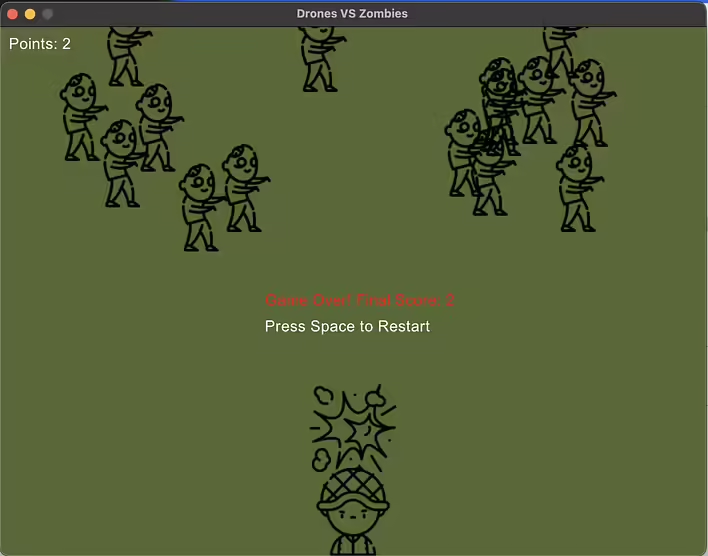
Дрон вбив оператора :(
For example, before publishing this post, I added a few things:
The drone operator can accidentally destroy himself with the drone
I added boundaries to the battlefield (before that, the drone could fly off the edge of the window and effectively get lost)


![[Fix] extconf.rb failed during the installation of the Ruby library Gosu](https://cdn.tseivo.com/ph1rtiabxj2jh76ht1pjn1in80n2)