All original content is created in Ukrainian. Not all content has been translated yet. Some posts may only be available in Ukrainian.Learn more

How to clone a GitHub repository?

This content has been automatically translated from Ukrainian.
To clone a repository from GitHub, you will need Git installed on your computer.
1. Open the web page of the repository on GitHub.
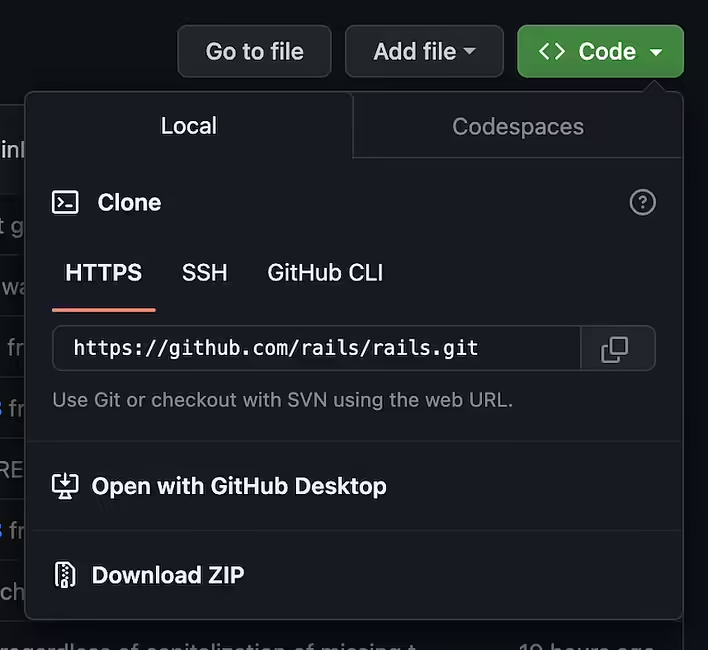
2. Click on the "Code" button on the repository's web page.
3. Select the first tab "Local"
github clone code button.png
4. Copy the repository URL. There are options for HTTPS, SSH, and GitHub CLI. We need HTTPS
5. Open the command prompt (Windows) or terminal (Mac) on your computer.
6. Navigate to the directory (in the terminal, use the cd command for navigation) where you want to save the cloned repository.
7. Type the command `git clone`, then paste the copied repository URL. For example:
   git clone https://github.com/username/repository.git
Replace `username/repository` with the username and repository name you want to clone.
8. Press Enter to run the command. Git will start downloading the contents of the repository to your computer.
That's it! The GitHub repository is now cloned to your computer, and you can work with its contents locally.
Cloning a repository using GitHub Desktop
There are a few more options for how to clone a repository from GitHub. For example, I use GitHub Desktop as a GUI (graphical user interface) for git.
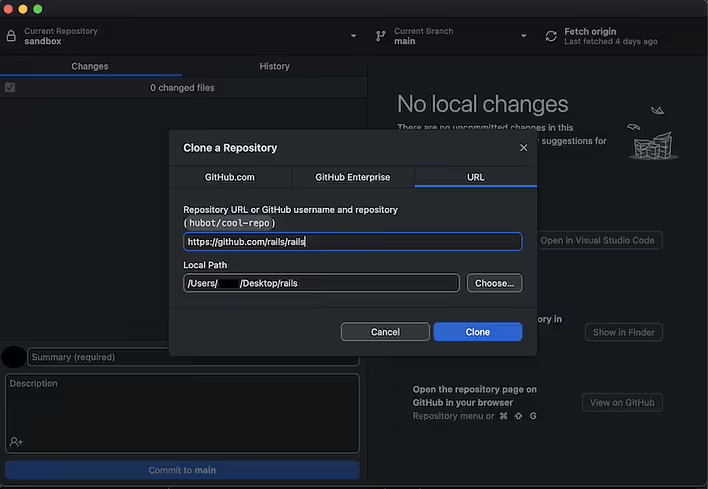
As you can understand from the name, this program is developed by the GitHub team. So we can see the "Open with GitHub Desktop" button, clicking on which will open (you need to install and set up this program on your computer first) this application.
github desktop.png
The interface is quite intuitive. We choose where to clone the repository, click Clone.
I usually recommend GitHub Desktop to people who know what Git is but have never worked with it (but should). I believe this is the minimal foundation to start learning Git more deeply.
This post doesn't have any additions from the author yet.

23 May 06:57

What is debugging?

meme code
meme code@memecode
23 May 07:41

What are attr_accessor, attr_reader, and attr_writer in Ruby? What are they used for?

meme code
meme code@memecode
23 May 11:16

How does the has_many through association (many to many) work in Ruby on Rails?

meme code
meme code@memecode
24 May 18:53

What are joins in Ruby on Rails and how does it work?

meme code
meme code@memecode
02 Jun 06:42

Error adding people to Google Family. Failed to load the page.

meme code
meme code@memecode
02 Jun 12:53

What does super do in Ruby?

meme code
meme code@memecode
23 Jun 12:07

What is Ubuntu? What is it used for?

meme code
meme code@memecode
23 Jun 12:35

What is an ISO image? Where are software ISO images used?

meme code
meme code@memecode
23 Jun 12:39

Where to download the official ISO file (image) of Ubuntu?

meme code
meme code@memecode
23 Jun 12:48

What is the difference between 32-bit and 64-bit processor architecture? Why is 64-bit architecture more popular now?

meme code
meme code@memecode
23 Jun 15:58

What is RST in SSD disk settings? What is RST needed for?

meme code
meme code@memecode
23 Jun 16:00

How to install Ubuntu on a laptop instead of Windows? Personal experience with the Acer Nitro 5 (AN515-54-5304) laptop.

meme code
meme code@memecode