Commit (English "commit") in the context of the Git version control system is a key concept that means saving changes in the local repository. It is a kind of snapshot of the current state of the project, which includes changes in code, configuration files, documentation, and other resources. Each commit creates a new version of the project that can be restored or viewed at any moment.
The word "commit" comes from the English language, where it means "to carry out," "to commit," "to decide," or "to fix." In the context of Git, this word reflects the essence of the process of fixing changes that become part of the project's history. This fixation is immutable, meaning that after a commit is created, its content remains constant, and it cannot be changed without creating a new commit (this is a simplified explanation, of course, data and commits can be manipulated in various ways).
Git is a version control system (SCM, or Source Control Management) that was created by Linus Torvalds in 2005, initially for managing the development of the Linux kernel. Git is a distributed system that allows each developer to have a complete copy of the project's history on their computer. This provides high flexibility in working with code, the ability to work offline, and independence from a central server.
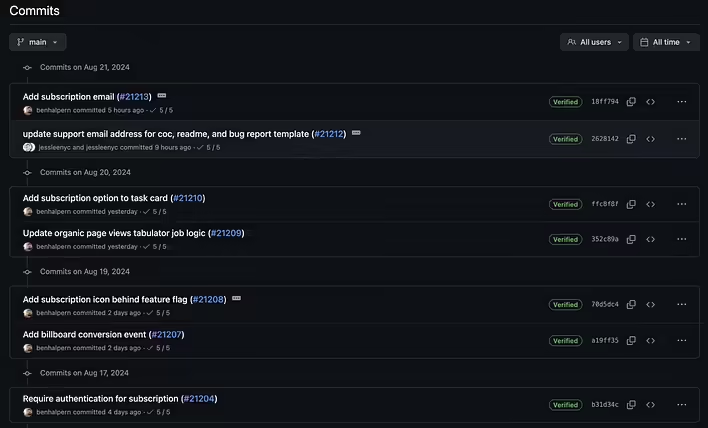
скріншот історії комітів репозиторію проєкту forem на GitHub
To make a commit in Git, you first need to prepare the changes by adding them to the index (staging area). This is done with the command git add, which adds the selected files to the index. After that, the command git commit fixes these changes in the form of a commit, adding a message that describes the changes made. For example, the command git commit -m "Updated README and added a new section on configuration" will create a commit with the corresponding message. It is possible to create an empty commit, but you can read about it here.
The process of creating a commit is important for tracking the development of the project. Each commit stores information about the author, the time of the changes made, and a message explaining what exactly was changed. This not only allows for preserving the project's history but also facilitates teamwork, where each participant can see who made certain changes and when, and why they were made. In case of mistakes or the need to revert to a previous version of the code, commits allow for easy recovery, preserving all intermediate versions.
A commit is an integral part of working with Git, allowing for effective management of changes in the project, preserving its history, and ensuring the ability to track and control all changes made.