All original content is created in Ukrainian. Not all content has been translated yet. Some posts may only be available in Ukrainian.Learn more

How to connect PlayStation controllers (DualShock / DualSense) 4 to Mac?

Table of contentsClick link to navigate to the desired location
This content has been automatically translated from Ukrainian.
In the clarity of MacBook Air m1 (macOS Sonoma) and DualShock 4 from PlayStation. Connecting the controller via Bluetooth is quite easy. The official instruction from PlayStation states that this method is universal and suitable for DualShock 4, DualSense, and DualSense Edge.

Turn off the controller

The first thing to do is to make sure the controller is turned off. Here’s an interesting point - how to turn off the controller? There is no separate button for this, but you can hold the PS button for about 6-10 seconds, after which the controller should turn off.

Enter Bluetooth device search mode

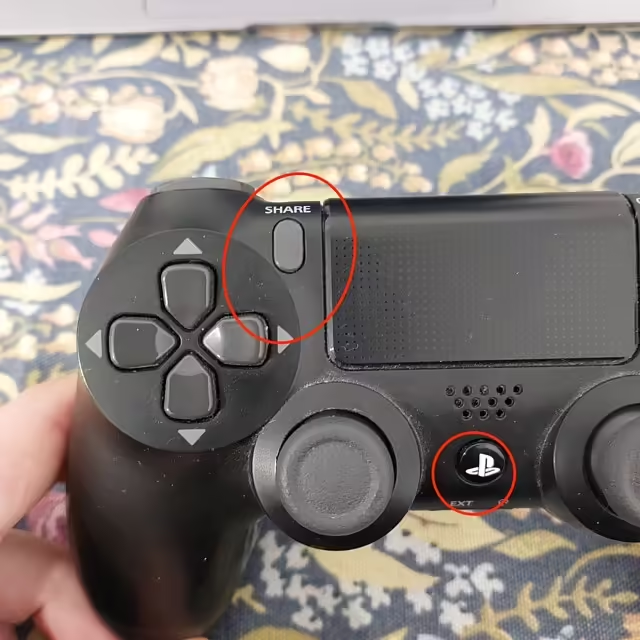
Simultaneously press the PS and Create or Share buttons, and hold until the indicator on the controller starts blinking. When the controller is blinking - it is in pairing mode, in which it can be detected on Mac (and not only).
Share та PS кнопки на контролері DualShock

Select your controller on Mac

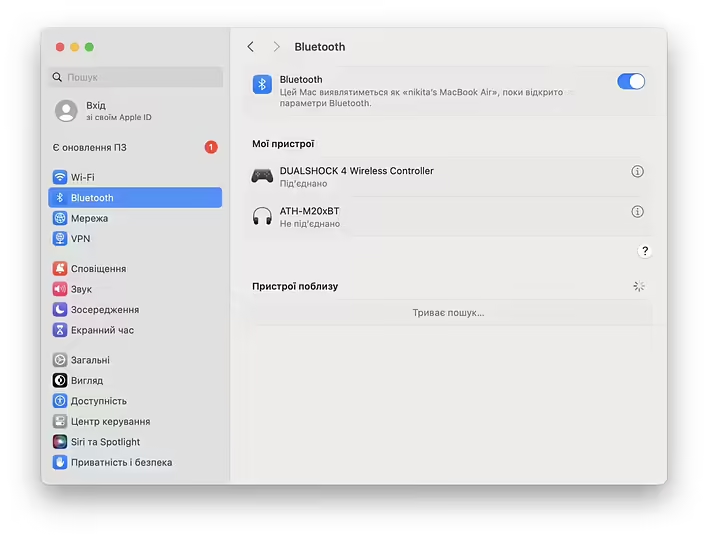
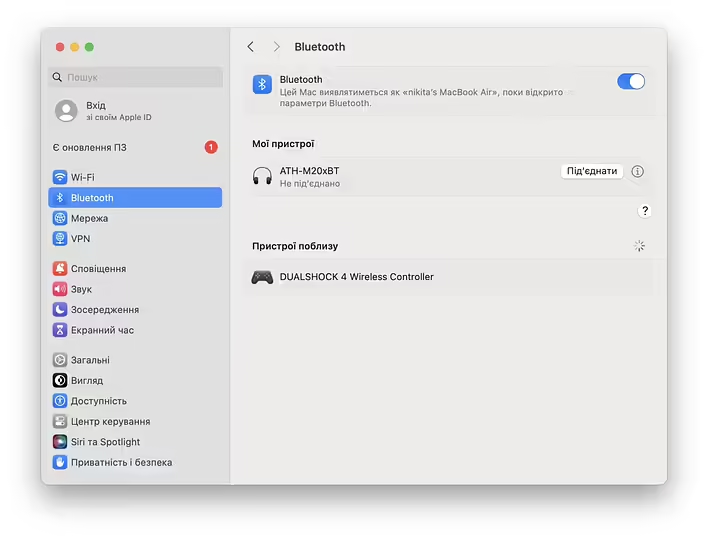
Open Bluetooth settings and select the controller from the list of nearby devices.
Пристрої поблизу - DualShock 4 Wireless Controller (macOS)
Select the controller and click on it to connect
Підключення DualShock 4 до macOS
That’s all. The instruction has been verified through personal experience with DualShock 4. If possible, I will add instructions for DualSense. Although the process should be identical (so says the official PlayStation page).
This post doesn't have any additions from the author yet.

30 Apr 21:45

Fixing Input Lag of the 8BitDo Pro 2 Bluetooth Gamepad on Mac

Трошки про ігри
Трошки про ігри@boring_gamer
List of songs from the game Need For Speed Underground
10 May 18:13

List of songs from the game Need For Speed Underground

Трошки про ігри
Трошки про ігри@boring_gamer
04 Jun 20:30

Launching Need For Speed Underground 2 on Mac M1

Трошки про ігри
Трошки про ігри@boring_gamer
12 Jun 06:29

Liftoff: FPV Drone Racing - an FPV drone simulator on macOS M1 (personal experience)

Трошки про ігри
Трошки про ігри@boring_gamer
27 Jul 14:19

Launching Liftoff: FPV Drone Racing on Ubuntu (personal experience)

Трошки про ігри
Трошки про ігри@boring_gamer
27 Jul 14:43

What is steamOS?

Трошки про ігри
Трошки про ігри@boring_gamer
01 Mar 10:42

[Review] Budget dock station for two DualShock 4 gamepads (iplay)

Трошки про ігри
Трошки про ігри@boring_gamer
PS Network and PS Store - An error occurred on the console. The mobile app shows a blank screen.
21 Mar 17:47

PS Network and PS Store - An error occurred on the console. The mobile app shows a blank screen.

Трошки про ігри
Трошки про ігри@boring_gamer
CS2 on macOS with M1 does not work, and support for CS:GO will end.
24 Mar 11:29

CS2 on macOS with M1 does not work, and support for CS:GO will end.

Трошки про ігри
Трошки про ігри@boring_gamer
Couldn't find the dragon in Spyro Reignited Trilogy (PS4) (`皿´#)
26 Apr 07:04

Couldn't find the dragon in Spyro Reignited Trilogy (PS4) (`皿´#)

Трошки про ігри
Трошки про ігри@boring_gamer
List of Dragons in Spyro Reignited Trilogy - The Dragon (PS4)
26 Apr 07:53

List of Dragons in Spyro Reignited Trilogy - The Dragon (PS4)

Трошки про ігри
Трошки про ігри@boring_gamer
The history of the Earthworm Jim video game series
26 May 11:32

The history of the Earthworm Jim video game series

Трошки про ігри
Трошки про ігри@boring_gamer