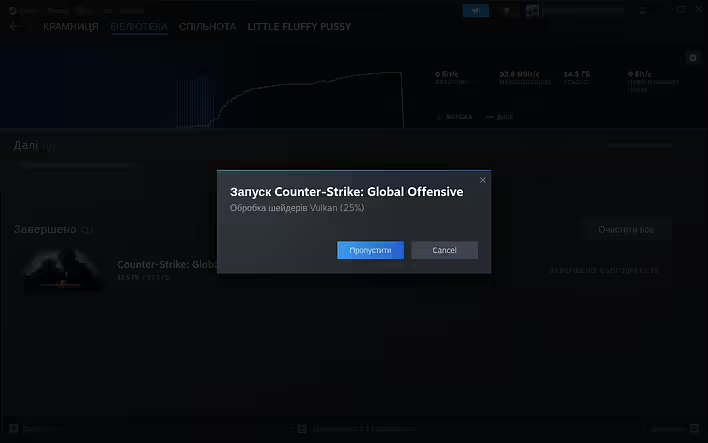
"Vulkan shader processing" is a Steam feature that is specifically used in Steam Play/Proton - a solution that allows running video games made for Windows on Linux.
Обробка шейдерів Vulkan
When you first launch a game, Steam analyzes the shaders (programs that perform calculations for rendering 3D graphics) of the game and converts them into a format optimized for use with the Vulkan graphics interface library. This process may take a bit (sometimes not a bit, depending on the computer) of time, but it is only done once for each game.
Vulkan shader processing can improve game performance, especially when using Steam Play/Proton to run Windows games on Linux, as Vulkan often offers better performance on Linux compared to DirectX, which is commonly used in Windows games.
It is also worth noting that this feature requires your graphics card and drivers to support Vulkan.
Can Vulkan shader processing be skipped?
You can skip this Vulkan shader processing in Steam, but it may affect game performance.
It is important to understand that shaders are a key part of rendering 3D graphics, and optimizing them can significantly improve game performance. If you choose to skip this process, shaders will be compiled "on the fly" during gameplay, which may lead to longer loading times, interruptions in the game, or even a decrease in overall performance, FPS, etc.
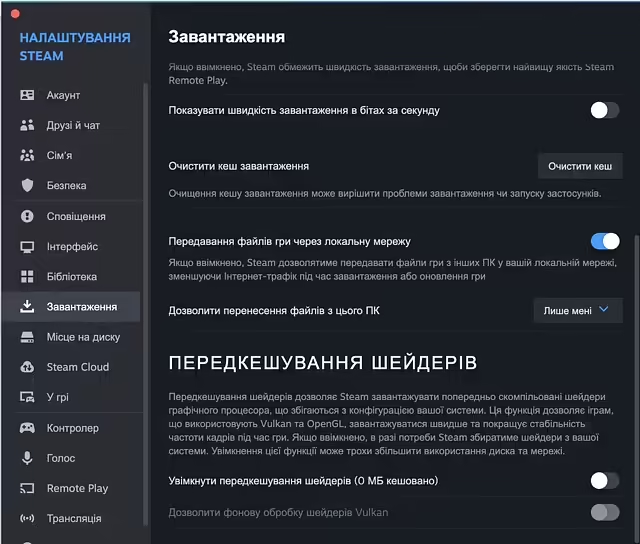
Передкешування шейдерів
But if you still need to skip shader processing, you can do so by opening the Steam settings, going to the "Downloads" section, and unchecking the "Shader pre-caching" option. Note that this may reduce game performance.
Alternatively, you can click the "Skip" button when launching the game.